
NewCustomsWiz: quotes, jobs and invoicing built around your CDUK declarations · 15-day free trial
Register
Customs Intelligent Document Processing

AI Customs Declaration Automation

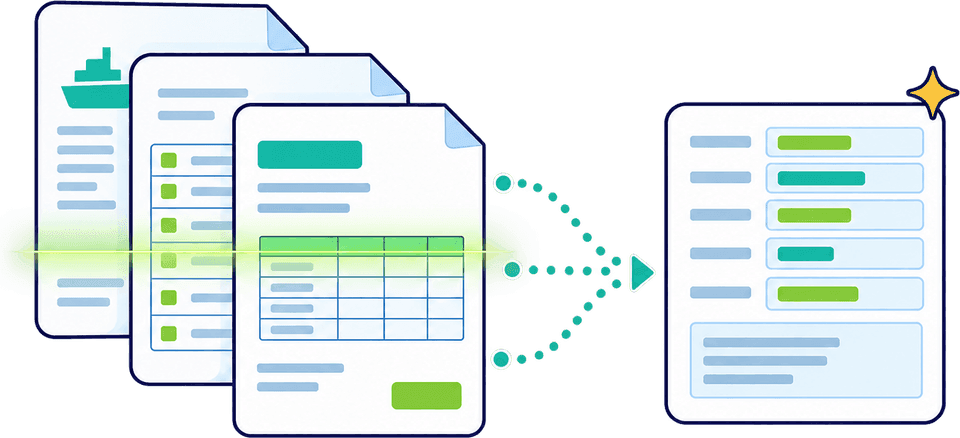
Turn commercial invoices, packing lists and transport documents into ready-to-file customs declarations. Our Customs Intelligent Document Processing (IDP) engine reads any document (PDF, image or Excel), extracts the data with OCR and AI, reconciles duplicates and conflicts, and auto-drafts your GB CDS Import & Export, GB ENS, EU ICS2 and NCTS6 declarations from a single upload. Customs clearance automation, included free on every declaration type.

  • Free on Every Declaration
  • OCR + AI Extraction
  • Auto-Draft Every Declaration Type
  • Human-in-the-Loop Review
  • Upload invoices, packing lists and CMRsDrop up to five documents in any common format — AI reads them and prepares a draft for review.
  • Review the extracted document detailsKey references land in the draft, and values that differ between your documents are flagged.
  • Parties filled from your documentsNames, addresses and EORI numbers extracted — swap exporter and importer in one click if needed.
  • Choose between your documents and templateWhere they disagree, both values sit side by side — the document value is used unless you pick the template’s.
  • Goods lines extracted and checkedEvery goods line drafted with its code checked — your team confirms classification and origin.
  • Merge duplicate lines, then create the draftLines repeated across documents are grouped — merge them, keep them separate, or let Auto decide.

In a nutshell

Customs teams lose hours re-keying the same data (invoice values, party details, weights, commodity codes) from documents into declaration after declaration. Customs Intelligent Document Processing removes that step: customs declaration automation that starts with the paperwork you already receive. It combines OCR with purpose-trained AI to read your commercial invoices, packing lists and transport documents, understand what each field means, and structure the data ready for customs. No templates and no manual data entry.

One extraction feeds every declaration you file. From a single set of documents, the platform can auto-draft a GB CDS import or export declaration, a GB ENS, an EU ICS2 (ENS) or an NCTS6 transit movement, with real-time HS code search, party matching against your saved profiles, duplicate-goods merging and reconciliation, and built-in validation before anything is submitted. Where documents contradict each other, the conflict is flagged for a one-click decision. Every draft goes to you for human review and confirmation. It is built for customs agents, brokers, freight forwarders and traders who file at volume, and it’s included free of charge for every declaration type.

FREE

Pricing

Included free. For every declaration.

Customs Intelligent Document Processing is free of charge on our platform for every declaration type we support. No per-document fee, no add-on subscription, no usage tier.

Latest enhancements

What’s new: reconcile, merge & search in real time.

This release adds cross-document conflict resolution, duplicate goods merging and reconciliation with full operator control, and a real-time commodity search that finds the right HS code as you type. It also adds bulk editing tools and Excel upload.

New · Conflict resolution

Documents contradict each other? You decide in one click.

Commercial invoices, packing lists and CMRs for the same consignment often contain inconsistent data. IDP presents each conflicting field side by side, showing the value from every document, and the value you select is applied to the draft.

  • Header and goods-item conflicts flagged across all uploaded documents
  • Template disagreements highlighted too: the extracted value is used unless you pick the template’s
  • No silent assumptions: the operator confirms before anything is drafted
New · Manage duplicates

Duplicate goods lines, merged & reconciled.

The same items appear on the invoice, packing list and CMR. IDP groups duplicates across and within your documents and consolidates them into final goods lines, with quantities, weights and values reconciled.

  • Auto, Merge all or Keep separate, per group or for the whole shipment
  • Advanced customised merging and document-priority rules decide how fields combine
  • Repetitions inside one document are added first; identical document totals are populated once, never doubled
  • Move any line between groups, and get warned when documents state different totals
New · Commodity search

Find the right HS code in real time.

Every goods line is validated. A partial code is guided to the full 10-digit commodity code, and a real-time search of the trade tariff finds the right code from a plain-English description.

  • Type a partial code and pick the full 10-digit completion
  • Search all commodities by description (“Barolo wine”, “laptops”) with instant results
  • Valid / incomplete flags on every line, before the draft is created
Also newExcel & spreadsheet uploadFill All RowsBulk Update Item InformationBulk Update Commodity RequirementsImport & Export drafts through to the HMRC response & MRN
Key features

Everything from document to declaration, automated.

From a single invoice to high-volume batch processing, customs declaration automation handles the reading, extracting and drafting. You only need to review and submit.

  • Any Document, Any Format

    Upload multiple shipment documents at once: PDFs, scanned images, photos and Excel spreadsheets, typed or handwritten. No fixed templates or pre-mapping.

  • OCR + AI Data Extraction

    Purpose-built OCR for customs documents combined with AI that understands context as well as characters. It reads header and line-item data, even from messy layouts.

  • Commercial Invoice Data Extraction

    Pull parties, addresses, EORI references, values, currencies, Incoterms, invoice and order numbers, net/gross weights and package counts straight from the commercial invoice.

  • Packing List & Transport Document Parsing

    Extract quantities, weights, dimensions and package data from packing lists, and route, container, vehicle and consignment data from CMRs, bills of lading, air waybills and booking confirmations.

  • Line-Item Level Extraction

    Every goods line is captured and mapped to a declaration item: descriptions, quantities, values and weights.

  • Cross-Document Conflict Detection

    Where documents contradict each other, IDP never guesses. Conflicting fields are flagged with each document’s value side by side, and you click the value to use. Template disagreements are highlighted the same way.

  • Duplicate Merge & Reconciliation

    Duplicate goods lines are grouped across documents and consolidated automatically. Or keep lines separate, or apply customised merging and document-priority rules.

  • Bulk Editing Tools

    Populate common information across many commodity lines in seconds with Fill All Rows, Bulk Update Item Information and Bulk Update Commodity Requirements.

  • Auto-Draft Across Every Declaration Type

    One extraction, many outputs. Feed the same structured data into a GB CDS Import/Export, GB ENS, EU ICS2 (ENS) or NCTS6 transit declaration, with no re-keying between systems.

  • Real-Time Commodity Search & HS Codes

    Partial codes are guided to the full 10-digit commodity code, every line is validated, and a real-time search finds the right code from a plain-English description, across the trade tariff.

  • Multi-Language Documents

    Read and extract from non-English commercial invoices and transport documents, so cross-border paperwork isn’t a bottleneck.

  • Human-in-the-Loop Review

    Confidence scoring flags uncertain fields for a quick check. You review, correct and confirm before drafting.

  • Party & Profile Matching

    Extracted consignors, consignees and other parties are matched to your saved EORI / party profiles, so repeat parties populate consistently.

  • Built-In Validation

    EORI, HS code, GRN and format checks run as the data is structured, catching errors early and preventing rejections.

  • Batch Processing & API

    Drop a whole batch of documents and process at volume, or connect your TMS, ERP or freight system via API to automate document intake and declaration drafting end to end.

  • From Draft to HMRC Response & MRN

    Generate an Import or Export draft from the extracted information, review or amend it as required, and continue straight through to submission and receipt of the HMRC response and MRN, all in one flow.

Coverage

From any document to any declaration.

Documents in

Read & extract from

  • Commercial invoices & proforma invoices
  • Packing lists
  • Transport documents (CMR, B/L, AWB, sea waybill)
  • Booking confirmations & manifests
  • Certificates & supporting documents
  • Excel spreadsheets & structured line lists
  • PDFs, scans, photos & email attachments in any layout or language
Declarations out

Auto-draft, ready to file

  • GB CDS Import declarations
  • GB CDS Export declarations
  • GB ENS (Safety & Security)
  • EU ICS2 (ENS) Entry Summary Declarations
  • NCTS6 transit (T1 / T2), with the TAD generated on release
Connected end to end

Plug IDP into the rest of your stack.

Intelligent Document Processing sits at the front of every workflow you already run on the platform, and one extraction flows straight into any declaration type.

How it works

From document to draft in four steps.

From a pile of paperwork to submission-ready declarations, with review built in.

  1. Step 1: Upload

    Upload your commercial invoice, packing list and transport documents in any format: one at a time, as a batch, by email intake or via API.

  2. Step 2: AI Extracts & Structures

    OCR and AI read the documents, extract header and line-item data, match parties to your profiles, group duplicate goods lines and validate commodity codes.

  3. Step 3: Review & Confirm

    Check the extracted data with low-confidence fields flagged for attention. Resolve any cross-document conflicts with a click, merge or separate duplicate goods lines, and update many lines at once with the bulk tools.

  4. Step 4: Auto-Draft the Declaration

    Choose your output (CDS Import/Export, GB ENS, EU ICS2 or NCTS6) and the platform drafts a validated declaration from the same dataset, ready to submit. Carry on through to the HMRC response and MRN.

Why CDUK

Turn document handling into a routine workflow.

A secure, cloud-based engine built around real customs data requirements. Customs clearance automation takes you from paperwork to filing faster, with fewer errors.

  • Included free of charge for every declaration type
  • Eliminate manual data entry and re-keying
  • Reduce the time from document to declaration submission to minutes
  • Reduce errors with AI extraction plus human review
  • Resolve cross-document conflicts with a single click
  • Merge & reconcile duplicate goods lines on your terms
  • Find the right HS code with real-time commodity search
  • Handle any format, layout or language
  • One extraction drafts multiple declaration types
  • Scale with volume without adding staff
  • Consistent, validated data across every filing
  • Securely processed with full encryption
Frequently Asked Questions

Document automation questions, answered.

What is Customs Intelligent Document Processing?

It’s AI customs document processing, the front end of customs declaration automation. It reads your commercial invoices, packing lists and transport documents, extracts the data with OCR and AI, and auto-drafts your customs declarations.

Which declaration types can it draft?

From a single extraction you can auto-draft GB CDS Import and Export declarations, GB ENS, EU ICS2 (ENS) and NCTS6 transit (T1/T2), all on the same platform.

Which documents can it read?

Commercial and proforma invoices, packing lists, and transport documents such as CMRs, bills of lading, air waybills and booking confirmations, along with supporting certificates and manifests.

What file formats does it accept?

PDFs, scanned images, photos, Excel spreadsheets and email attachments, typed or handwritten, single or multi-page, uploaded one at a time or together. There are no fixed templates to set up.

How accurate is the AI, and do I retain control?

Every extraction is scored and presented for human review, with any low-confidence field flagged for a quick check. You confirm the data before a declaration is drafted, so you have full control.

What happens if my documents contain conflicting data?

IDP compares header and goods-item fields across every document you upload. Where values differ (say the invoice states one place of unloading and the CMR another), the field is flagged with each document’s value side by side, and you click the one to use in the draft. It also highlights where your saved template disagrees with the documents; the extracted value is used unless you pick the template’s.

How does it handle duplicate goods lines across documents?

Duplicate goods found across your documents are automatically grouped and reconciled. Lines repeated inside one document are added together first; the resulting document totals are then compared, and identical totals are kept once, never doubled. You choose Auto, Merge all or Keep separate, per group or for the whole shipment, or apply advanced customised merging and document-priority rules. Quantities, weights and values follow the same rule. You can move lines between groups, and where documents state different totals the platform warns you and you can select the suitable option.

Does it handle documents in other languages?

Yes. It can read and extract from non-English commercial invoices and transport documents.

Can it find and validate HS / commodity codes?

Yes. Every goods line is validated, and classification help is built in. Type a partial code and IDP guides you to the full 10-digit commodity code. Or use the real-time commodity search to find the right code from a plain-English description (“Barolo wine”, “laptops”) across the trade tariff. The classification decision stays with you.

Can I update many goods lines at once?

Yes. Fill All Rows, Bulk Update Item Information and Bulk Update Commodity Requirements populate common information across multiple commodity lines in a couple of clicks, instead of editing line by line.

Does it submit the declaration automatically?

No. It drafts a validated, submission-ready Import or Export declaration for your review. You review or amend it as required, then continue through to submission and receipt of the HMRC response and MRN. You always have full control of the final submission to HMRC or EU customs systems.

Can I process documents in bulk or connect my own systems?

Yes. Process batches of documents at once, or connect your TMS, ERP or freight software via API to automate intake and drafting end to end.

Is my data secure?

Documents are processed securely with full encryption on our cloud platform.

Is there a demo I can watch?

Yes. Watch the Intelligent Document Processing demo to see the full workflow, from document upload to draft declaration. Or register now and try it with your own documents.

How much does it cost?

Nothing extra. Customs Intelligent Document Processing is free of charge on our platform for every declaration type, with no per-document fee and no add-on subscription. You only pay the standard per-declaration price for the filing itself.

Automate Your Customs Declarations for Free

Stop re-keying invoices. Let Customs Intelligent Document Processing read your documents and draft your CDS, ENS, ICS2 and NCTS6 declarations: customs declaration automation, free of charge, with review built in and your team in control. Create your account and process your first document in minutes. Filing at high volume? Get in touch and we’ll tailor a plan around your needs.