LiveNCTS6 transit declarations are now live — alongside CDS, GB ENS, EU ICS2, GB GVMS and French ELO
Register
Customs software · Data entry

Reduce Manual Customs Data Entry

Start with the information you already have. CDUK brings invoices, packing lists and shipment records straight into declaration preparation, so you do not key every field from the beginning. Your team files directly with HMRC, with less data entry, fewer typing errors and a lower cost per entry.

  • AI document processing
  • Saved parties
  • Cloned entries
  • Bulk editing
  • Drop in invoices and packing listsDocuments are read into a draft your team reviews, so little is keyed from scratch.
  • Resolve values that differ by documentWhere documents disagree, both values are shown and your team chooses which one the draft uses.
  • Goods lines drafted from the documentsEvery line is extracted for your team to confirm — classification and origin stay your decisions.
  • Clone an accepted declarationStart the next shipment from a finished one, so only quantities and values need updating.

In a nutshell

Invoices, packing lists and shipment records repeat the same parties, goods and values. Retyping them into a declaration is slow, and every retyped field risks a mistake. Customs Declarations UK (CDUK) is the platform for filing your own declarations, with multiple ways to avoid starting from a blank form: AI document processing (IDP), saved party details, cloned entries, spreadsheet import and bulk editing across goods items on GB Customs Declaration Service (CDS) declarations.

You have full control of every declaration: you review the draft, resolve anything the documents disagree on and submit directly to HMRC, with built-in validation and our UK support behind you. A full audit trail shows what was extracted, what was changed and who confirmed it.

This page helps you choose the starting point for each shipment. Pay as you go with no monthly fee, and no per-document fee for IDP. The AI document processing page describes IDP in full.

Choose your starting point

Choose the best starting point

The fastest workflow depends on the quality and structure of your source information. IDP suits document-based work, while a clean spreadsheet can be a quicker input for bulk data than a scanned PDF. Select the card that matches what you have.

Use IDP to extract data, then review

  • IDP
  • Review before confirming

Upload your commercial invoice, packing list or transport document. IDP extracts the parties, goods, quantities and values into a reviewable form and prepares a structured draft. You check the extraction, resolve any conflicts between documents and correct what needs correcting before you confirm.

  • Best when the information exists only in PDFs and scanned documents
  • Missing values and unclear scans are flagged for your review
  • No per-document fee on supported declaration types

IDP produces a draft your team reviews; you confirm every field.

How IDP works
The full comparison

Starting points at a glance

The same five starting points as a table. Most operations use two or three of them side by side, matching the method to the paperwork in front of them.

Your starting pointA more practical workflow
Invoice, packing list or transport documentUse IDP to extract the data, then review it
Familiar customer or supplierRetrieve saved party information
Similar previous shipmentClone the entry and update the changed facts
Structured spreadsheetUse the supported import template
Repeated details across CDS goods itemsApply bulk edits to the relevant lines

The best choice depends on the structure of your source information, and many shipments combine two or more.

Illustrative example

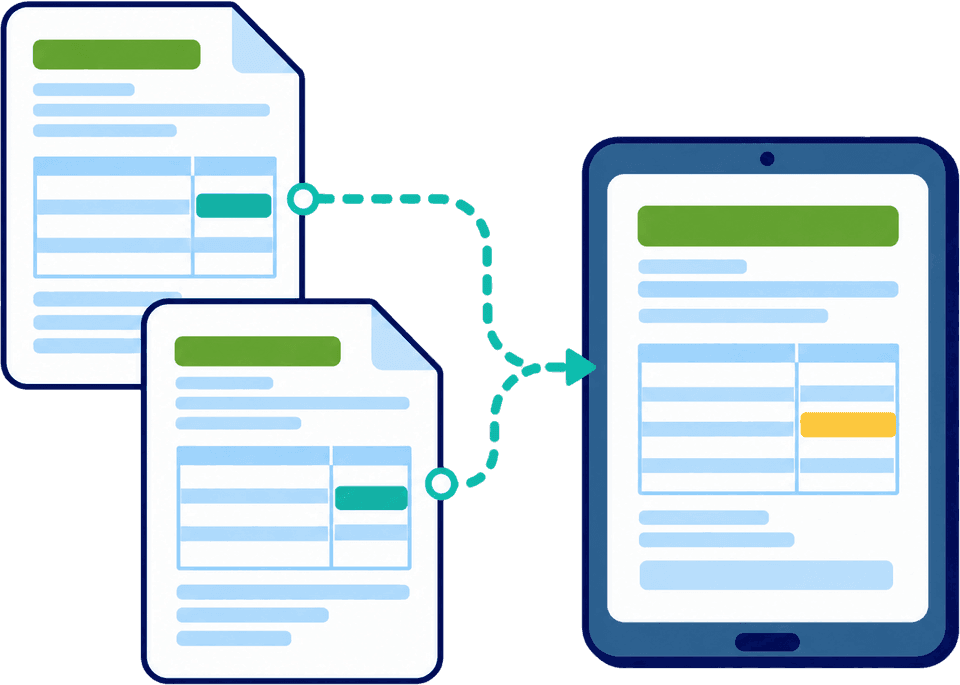
When documents disagree, review the difference

An invoice may show one weight and a packing list another. CDUK’s document review workflow shows conflicting values side by side. Your operator checks the source and chooses the correct information before the draft moves forward, so errors are caught before they reach HMRC.

Document review

One value chosen deliberately

The example on this page shows an invoice and packing list that state different gross weights. Neither value is silently preferred. Your operator checks which document is correct for the shipment, picks it and the draft carries that value, with the choice recorded in the audit trail.

The same applies to repeated goods lines. You decide whether two records describe the same goods or separate items, and CDUK’s grouping flags the candidates. Nothing is merged without your say.

  • Conflicts are shown side by side so the source is easy to check
  • Your operator picks the value; nothing is decided silently
  • Duplicate-looking goods lines are flagged for your review
Reuse with confidence

Reuse facts. Recheck decisions.

A saved party address works across many shipments. A previous origin claim, customs value or procedure may not apply to the next one, so your reviewer checks changed information and the evidence behind it, even when the entry began as a clone.

Separate what is stable (names, addresses, registration details) from what is a decision (origin, value, procedure, classification). Reuse the first group freely, treat the second as new every time and keep the supporting evidence where your reviewer can find it. CDUK’s validation, commodity code lookup and audit trail support that step; see improving customs compliance.

Ask how CDUK prepares the draft
How to try it

Test it on the work you type by hand

Pick one document type you key today and compare it with the same job in CDUK. Accounts are activated instantly with no monthly fee and no minimum volume, so the test costs only the declarations you file. Our UK team can help you set up the comparison.

  1. Step 1: Choose one document

    Take a commercial invoice or packing list your team usually retypes, ideally from a supplier whose format is awkward. A real, slightly difficult document gives you an honest baseline from your current method.

  2. Step 2: Prepare the draft

    Let IDP extract it into a draft, or start from a saved party, clone or spreadsheet, whichever suits the shipment. Whichever route you pick, the information lands in the same declaration workspace, with validation and commodity code lookup to guide you.

  3. Step 3: Review and correct

    Resolve any conflicts between documents, fill the gaps CDUK has flagged and confirm the draft. Your operator decides every value that matters, and the audit trail records what changed.

  4. Step 4: Compare the effort

    Compare preparation time, review time and corrections with your current method. The difference is the time and cost you save on every entry of this kind. Our team can help you scale the figure to your volumes.

Frequently Asked Questions

Questions about data entry.

Does IDP remove all manual work?

It removes most of the retyping. Missing data and extraction errors are flagged for your team, and classification, origin and valuation stay your decisions, with the platform guiding and checking them. You review the draft before submitting it directly to HMRC. Read more on the AI document processing page.

Can I edit the extracted information?

Yes. Review and correct the information before you confirm the draft and submit the declaration. Where documents disagree, CDUK shows the conflicting values side by side so you can choose, and the audit trail records what changed and who changed it.

Is document processing an extra charge?

No. There is no per-document fee for IDP on supported filing workflows. Declaration charges still apply. Pay as you go with no monthly fee and no minimum, or choose a custom plan with volume discounts. See our pricing page.

Should I use documents or a spreadsheet?

Use whichever holds your cleanest information. If the data already sits in a structured sheet, a CSV or Excel bulk upload is usually the quickest route. If it exists only on PDFs, start with IDP. Our team confirms template support for your declaration type, and you can mix both methods.

Can I reuse an old declaration for a new shipment?

Yes, by cloning it and updating what changed. Party details carry across well, while origin claims, customs value and procedure are checked against the evidence for the new shipment. Saved templates give your most common entries a ready starting point.

What if two goods lines look the same?

You decide whether they describe the same goods or genuinely separate items, and merge or keep them apart on that basis. CDUK’s grouping flags the candidates, and the choice stays with your team.

Bring a Document You Usually Type by Hand

We will show how CDUK turns it into a draft your team reviews and submits directly to HMRC. Book a walk-through to see it on your own paperwork, or register now (accounts are activated instantly) and try it today.