
LiveNCTS6 transit declarations are now live — alongside CDS, GB ENS, EU ICS2, GB GVMS and French ELO
Register
Platform · Integrations & APIs

Connect Your Systems and Data to Customs Filing

Four ways to get your shipment data into CDUK: a public REST API, CSV and Excel import, document upload and email intake. Every route lands in the same draft, checked by the same validation and reviewed by your team, then filed directly with HMRC from your own account.

  • REST API
  • CSV & Excel import
  • Document upload
  • Email intake
  • Send the JSON your system already makesA mapping profile turns your fields into ours, tested against full validation before you save it.
  • A credential for each systemOAuth2 clients or API keys, each limited to the declaration types and actions it needs.
  • Outcomes pushed to your systemsSigned events arrive as customs responds, and the full message history is always there to catch up.
  • Every route lands in one placeAPI, spreadsheet, document and email drafts are reviewed and filed the same way.

In a nutshell

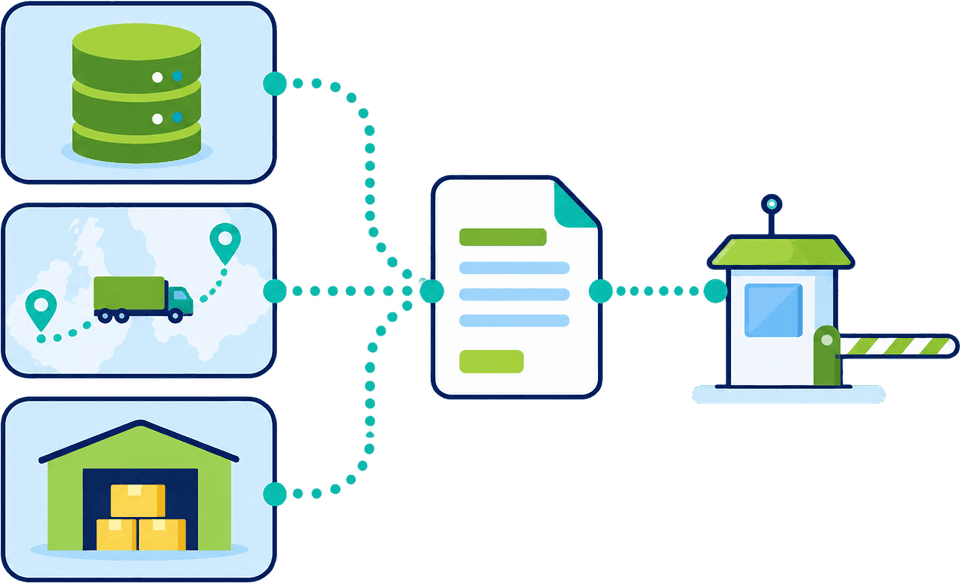
Your ERP, TMS and WMS systems, your spreadsheets and your suppliers' paperwork already hold most of what a customs declaration needs. Integration simply means that information reaches CDUK without anyone typing it again.

Choose the route that suits each flow. Connect your systems through our documented REST API, upload a spreadsheet, drop in supplier documents, or forward an email. You can use one route or all four on the same account.

Whichever way the data arrives, it becomes the same draft in the declaration workspace, checked by the same validation and reviewed by your own team before it is filed directly with HMRC.

Four ways in

One platform, four routes to a draft.

Systems that already produce records suit the API, spreadsheets suit import, and suppliers who only send paperwork suit document upload or email. All four end in the same reviewable declaration.

Let your systems talk to CDUK directly

  • OpenAPI / Swagger
  • CDS, ENS, ICS2, NCTS6

Our public API is documented in OpenAPI / Swagger and open to browse before you sign up. It covers GB CDS import and export, GB Safety & Security (ENS), EU ICS2 and NCTS6 transit, so one connection serves the filings your operation makes.

  • Create drafts, validate and track outcomes from your own systems
  • Your team reviews and submits, or the integration submits where you choose
  • Signed notifications as each customs outcome arrives
  • Documentation you can read before you register

API access is switched on for your account with our team.

Explore the API (opens in a new tab)
The whole journey

How your data reaches HMRC.

Whatever the source, the path is the same: data arrives, is mapped and validated, is reviewed by your team (or submitted by your integration where you choose), is filed with HMRC, and the outcome comes back to you.

From source to outcome
  • ERP / TMS / WMSParties, values, routes, packages
  • SpreadsheetsShipment lines in CSV or Excel
  • Supplier documentsInvoices, packing lists, CMR
  • Email inboxForwarded paperwork
  1. Step 1: Data arrives

    Through the API, a spreadsheet, a document upload or an email.

  2. Step 2: Mapped and validated

    Matched to the declaration and validated, so gaps surface before filing.

  3. Step 3: Reviewed or submitted

    Your team reviews and submits, or a permitted integration submits.

  4. Step 4: Filed with HMRC

    Filed from your own account, always with full validation.

  5. Step 5: Outcomes come back

    References and releases recorded, and sent on to your systems.

One draft, one validation, one review step, however the data arrives.

Two connections, two owners

We run the authority side. You choose your side.

Two separate connections make the exchange work. We operate the first for you. The second links your own data to your CDUK account, through whichever route fits.

Authority side

CDUK to HMRC and the community systems

We operate the connections to HMRC and to the UK community system providers (CNS, MCP/Destin8 and CCS-UK), so there is nothing for you to build, certify or maintain. See port and CSP connectivity.

  • Declarations filed directly from your account
  • Responses recorded against each declaration
  • Operated and maintained by CDUK as part of the service

Your side

Your systems to CDUK

Pick the route per flow: the API for your core systems, import for spreadsheets, upload and email for suppliers' paperwork. Our UK team helps with onboarding, mapping and go-live.

  • Start with a spreadsheet and add the API later, on one account
  • Your team reviews every declaration, or you permit direct submission
  • Outcomes can flow back to your systems
The API at a glance

Built for developers and customs teams.

The interface is documented publicly in OpenAPI / Swagger, so your technical team can assess it before you commit to anything.

  • OpenAPI / Swagger documentation
  • OAuth2 client credentials
  • API keys with expiry
  • Scoped credentials
  • JSON and CTC XML
  • Mapping profiles
  • Schema discovery
  • Dry-run validation
  • Idempotent retries
  • Signed webhooks
  • Full message history
  • 100+ documented error codes
What the API gives you

Less to build, more to rely on.

Each capability shortens your build, protects your account or keeps your customs team in control of what is filed.

  • Credentials with least privilege

    Sign in with OAuth2 client credentials or a simple API key. Your administrator creates them in the portal and limits each one to the declaration types and actions it needs. Credentials can be edited, revoked and reinstated.

  • Key lifecycle

    Keys can carry an expiry date, and administrators are emailed 30, 7 and 1 days before. A replacement key can run alongside the old one, so there is no gap in service.

  • Your JSON, our schema

    If your system produces its own shape of JSON, build a mapping profile in the portal with no code. Your system sends what it already produces and we translate it. Mapping applies to inbound data only.

  • Schema discovery

    The API publishes every field you can set for each declaration type, flagged required, optional or conditional, with a generated example. Developers do not have to guess field names.

  • Validate before you file

    A dry-run returns the full validation report without filing anything. It needs no HMRC authorisation, so you can build and test before your account is authorised.

  • Draft first, submit when ready

    The careful default creates a draft your team reviews and submits in the portal. Where you choose, a credential with the submit permission can create and submit in one step.

  • Safe retries

    Retry a request with the same idempotency key and it never creates a second declaration.

  • Templates and filing for clients

    Reference a saved CDS, ENS or ICS2 template, and anything your system sends takes priority over it. Agents, brokers and forwarders can file for the traders they act for, lodged under the trader's account, with a readiness check that confirms HMRC authorisation first.

  • Errors that explain themselves

    A published catalogue of more than 100 error codes, each with its meaning, cause and fix, open to browse without signing up. The error format is versioned, so error handling is built once.

Illustrative examples

See how it works in practice.

Mapping profiles

Keep your data shape. We map it to ours.

Map your fields to our canonical fields, convert values, set defaults and handle repeating goods lines, all in the portal. Then test a sample against full validation before you save. Your system sends its native JSON and names the profile.

  • No code, built by your own administrator
  • Convert values, such as your own wording for transit type
  • Tested against full validation before it goes live
Webhooks and history

Hear about every outcome, and never lose one.

As each outcome arrives from customs, a signed event is sent to your secure endpoint. If delivery fails, we retry, and an endpoint that keeps failing is switched off with your administrators emailed. The full history is always available to fetch.

  • Signed with a secret you can rotate
  • Automatic retries for about ten minutes
  • Optionally include the original customs message
Errors

Errors that tell you what to do next.

Every error code comes with its meaning, its likely cause and the fix. Because the catalogue is public, your developers can plan error handling before go-live.

  • Over 100 documented codes
  • A clear retry signal when limits are reached
  • Requests rate limited per credential, payloads up to 5 MB
Which route fits

Pick the route that matches your data.

Routes combine freely on one account. Use this as a starting point, and our team will help you decide for each flow.

RouteBest whenWhat you needWhat comes back
REST APIYour systems hold the data and volumes are high or regularA developer, API access switched on, credentials from your administratorA draft or submission, validation reports, signed outcome events and full history
CSV & Excel importYou can export shipment lines from a system or spreadsheetA spreadsheet of lines, no developmentA draft in the workspace, with lines merged into goods items where relevant
Document uploadSuppliers send invoices, packing lists and transport documentsThe documents as PDFs, scans, photos or ExcelA draft with differences between documents shown for your decision
Email intakePaperwork arrives by email and you want it to start itselfForward the email with its attachmentsA draft CDS or ENS declaration for your team to review

Every route ends in the same draft, the same validation and the same review.

Getting connected

From first conversation to live connection.

Our UK team works with you at each stage.

  1. Step 1: Register and authorise with HMRC

    Accounts are activated instantly. Authorise the platform with HMRC from your account settings and you are ready to file.

  2. Step 2: We switch on API access

    We enable the API for your account and help you decide which declaration types and actions each connection needs.

  3. Step 3: Create credentials and mapping profiles

    Your administrator creates scoped credentials and builds mapping profiles in the portal, with our team alongside you.

  4. Step 4: Test with representative records

    Validate and create drafts using real-looking records. Your team reviews them in the workspace, so you see the result before anything goes live.

  5. Step 5: Go live

    Switch on webhooks and, where you choose, direct submission. Your team keeps its review step wherever you want it.

Frequently Asked Questions

Integration questions, answered.

Which declarations does the API cover?

The API covers GB CDS import and export, GB Safety & Security (ENS), EU ICS2 and NCTS6 transit. Other services are filed in the platform itself. Tell us which flows you want to automate and we will confirm the best route for each.

Can we see the documentation before signing up?

Yes. The API is documented publicly in OpenAPI / Swagger, and the error catalogue is open to browse too. Your developers can assess the whole interface and plan error handling before you register.

Do we have to change our system's data format?

No. If your system produces its own JSON, your administrator builds a mapping profile in the portal with no code. Your system sends its native data, and we map it to the declaration. Responses and notifications always use the API's own format.

Can an integration submit without human review?

By default, the API creates a draft that your team reviews and submits. Where you choose, a credential with the submit permission can create and submit in one step. You decide this per credential.

How do we know what happened to a declaration?

As each customs outcome arrives, we send a signed event to your endpoint. You can also fetch the current status and the full customs message history of any declaration at any time, including the original message exactly as sent.

What if our endpoint is down?

Failed deliveries are retried for about ten minutes. An endpoint that keeps failing is switched off automatically and your administrators are emailed. Nothing is lost, because the status and message history can always be fetched afterwards.

Can we start with spreadsheets?

Yes. CSV and Excel import needs no build, and for CDS it can merge rows that share a commodity code and country of origin into goods items. You can begin here and add the API for your highest-volume flows on the same account.

What if suppliers only send PDFs or emails?

Upload them, or forward them by email. AI document processing reads invoices, packing lists and transport documents and drafts the declaration. Differences between documents are shown for your reviewer, and the service is included free when you file with us.

How are credentials secured?

Your administrator creates and manages credentials in the portal, limits each to the declaration types and actions it needs, and can revoke or reinstate it. Keys can expire with advance email warnings, and a replacement can run alongside the old one. Webhook events are signed with a secret you can rotate.

What does it cost?

Filing is pay as you go, with no monthly fee and no minimum volume, and custom subscription plans give volume discounts. Document processing is included free. See pricing or talk to our team.

Connect Your Systems With Us

Browse the API documentation, or tell us about your systems and the flows you want to automate. Accounts are activated instantly, with pay as you go pricing, no monthly fee and no minimum volume. Our UK-based team helps with onboarding, mapping and go-live.