
LiveNCTS6 transit declarations are now live — alongside CDS, GB ENS, EU ICS2, GB GVMS and French ELO
Register
Customs software · Logistics providers and 3PLs

Customs Software for Logistics Providers & 3PLs

Bring your customers’ customs filing in-house, on one account, alongside the warehousing and transport you already run. Your team prepares, submits and tracks every declaration itself, with full visibility, no monthly fee and our UK team behind you.

  • Filing for customers
  • Document extraction
  • Reusable party data
  • One account for every filing
  • Turn customers’ e-mails into draftsForward each customer’s invoices and packing lists. AI drafts the declaration for your team to review.
  • Pick a saved customer in one clickEORI, delivery site and representation fill from the saved party, so each customer’s details stay correct.
  • Submit the declaration for your customerFile on their behalf from your own account, then follow the result alongside the stock movement.
  • See every customer’s declarations in one listFilter by customer to find drafts and responses across stock-in, despatch and transfers on one account.

In a nutshell

Your customers rely on a third-party logistics provider (3PL) to coordinate goods, documents and deadlines, and customs sits in the middle of all three. When customs is late or wrong, your service level suffers. Customs Declarations UK lets your own team file it: GB Customs Declaration Service (CDS) entries, plus safety and security, transit and crossing-reference filings, with parties, procedures and supporting documents kept together on one account.

Filing in-house means you stop paying a fee on every customer entry and stop waiting on someone else to prepare it. You save time and cost: saved party data and document processing do the repeat work, and you pay only per declaration filed. You have full control: your team prepares, checks and submits each declaration directly to HMRC with built-in validation, and sees every response in one place.

Start with one customer journey, then widen it as the handover between operations and customs proves itself. Your team learns the platform on familiar shipments, and every new customer builds on the saved data. Connecting warehouse or transport data is scoped with us. Pay as you go, with no monthly fee and no minimum volume.

Why it matters

The same shipment, described three ways.

A warehouse receipt, a transport booking and a commercial invoice rarely carry identical information, and that is where customs rework starts. Filing on one platform puts all three in front of your team, so each field has an owner and every disagreement is settled before submission.

  • Goods-in records

    Receipts and stock records show what physically arrived. Your team brings them into the declaration and translates them into customs terms, with nothing retyped into a separate tool.

  • Transport details

    Routes, vehicles, ports and dates decide which formalities apply. One account covers the CDS, safety and security, transit and GMR filings they trigger, so your team sees the full set for a movement together.

  • Commercial documents

    Invoices and packing lists carry the parties, values and goods descriptions a declaration is built from. IDP turns them into a draft your team reviews, which removes much of the repeat keying.

  • Customer representation

    Filing for a customer rests on the right representation arrangements. Keep them with the saved customer record, backed by a complete audit trail.

  • Exceptions with an owner

    Missing values, mismatched weights and unclear descriptions are flagged by real-time validation, so a named person on your team resolves them before submission.

  • Responses back to operations

    Acceptance, queries and release updates matter to the people moving the goods. Notifications and history keep operations informed, and customer service can answer status questions from the platform.

How the information meets

Three inputs. One customs review.

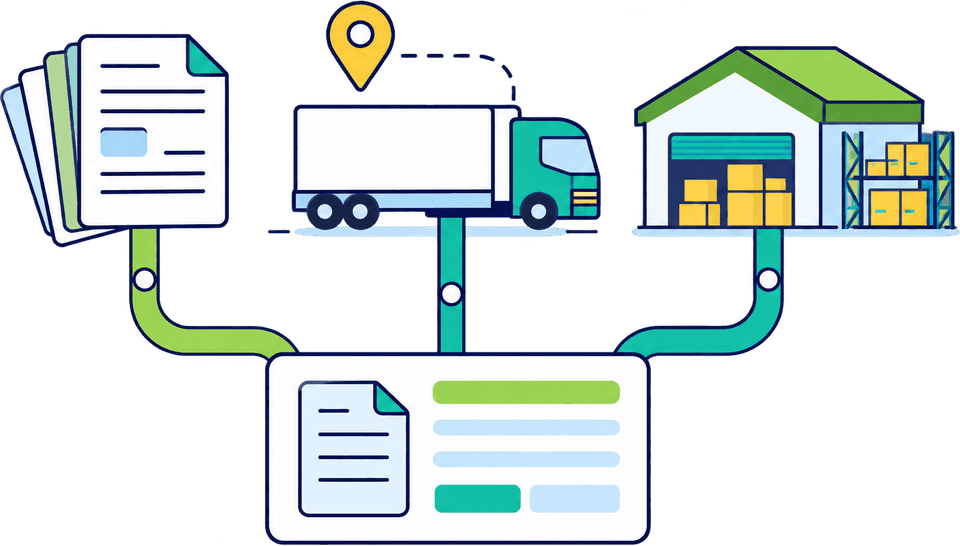
Commercial documents, transport details and warehouse data all feed one step: a review where your own team checks the declaration before it is submitted. Nothing is rekeyed or waits in someone else’s inbox.

Your operating process
  • Commercial documentsInvoices, packing lists and transport documents. IDP extracts them into a draft your team reviews.
  • Transport detailsRoute, ports, vehicle and carrier, as booked, ready to attach to the right filings.
  • Warehouse dataGoods-in quantities, packaging and references from your WMS or receipts, via upload or a connection scoped with us. The same data is reused for every filing on the shipment.
  1. Step 1: Reconcile the fields

    Your team compares parties, weights, quantities and references, and agrees which source wins for each field.

  2. Step 2: Customs review

    A named colleague checks classification, value, origin, procedure and evidence, guided by tariff lookup and validation. The record shows who did it.

  3. Step 3: Submit

    File the declaration directly with HMRC, plus any safety and security, transit or crossing-reference filings that apply, all from the same account.

  4. Step 4: Pass responses back

    Operations see status and queries as they arrive, and know who acts on them.

A working pattern for filing in CDUK, with connections to your own systems scoped with us.

Match filing to service

Three services, three different filing jobs.

Each service a 3PL sells brings its own filings. Pick yours to see how your team files it in CDUK, from customer entries to road crossings and customs warehousing, all from one account with one history.

Prepare GB CDS entries on behalf of customers

  • GB CDS
  • IDP
  • Customer records

Where you hold the appropriate representation arrangements, your team files GB CDS import and export declarations for customers and keeps the correct parties, procedures and supporting documents with each one. Saved party data saves retyping, and every entry is reviewed before it goes. Because you file for customers yourself, you control the timing and the cost of each entry.

  • Keep each customer’s parties and documents together against the declaration
  • Start from invoices and packing lists with IDP, with no per-document fee
  • We set up the account structure and access for several customers with you

We set up multi-customer account structure and access with you at onboarding.

GB CDS declarations
Agree it before scaling

Who owns each field?

Customs rework in a logistics operation often comes from fields nobody was asked to own. This illustrative map shows how to give each field an owner for a customer lane.

Illustrative example
InformationUsually starts inWho resolves differencesWhere it matters in the filing
Consignor, consignee and declarant detailsCustomer master data or bookingCustomer service with the customerParties on the declaration and the representation basis
Goods description, value and currencyCommercial invoiceCustoms team with the customerCommodity and valuation information reviewed before submission
Packages, weights and quantitiesWarehouse receipt or packing listWarehouse operationsItem and consignment data, reconciled by your team before submission
Route, carrier, vehicle and crossingTransport booking or TMSTransport planningWhich safety and security, transit and GMR formalities apply
Procedure and supporting evidenceCustomer instructionsCustoms teamDeclaration type, special procedure and attached documents

Your own map will differ. With every field owned, volume can grow without the rework.

Illustrative example

When the sources disagree.

Document processing shows conflicts straight away, while your team decides which value is right. Catching a mismatch before submission avoids amendments, queries and delays later.

Example

Reconcile your warehouse record against the draft

When the invoice and packing list disagree, document processing shows the conflict for review. A named colleague on your team compares the draft with your goods-in or warehouse record, decides what is correct and updates the source.

  • Review conflicting fields before the entry is submitted
  • Update your own record so every later shipment starts cleaner
Design the handover

Start with one customer and one flow.

A small start shows your team where to step in before you spread the process across customers. We work through each step with you, and each lesson is reused for every customer you add.

  1. Step 1: Choose a customer and a lane

    Pick a customer and route with regular volume and typical exceptions.

  2. Step 2: Map the information

    Follow what you receive, who reviews the declaration and what response goes back to operations. We help you set it up in the platform, and saved customer records mean the setup is done once and reused.

  3. Step 3: Test with real shipments

    File real entries, including awkward ones, and note where staff intervene. Our team supports you throughout.

  4. Step 4: Expand in stages

    Add customers, lanes and sites once the handover works. Each addition reuses the saved parties, templates and training from the last. We plan volumes, Community System Provider (CSP) connections and training with you.

Frequently Asked Questions

Questions from logistics providers.

Is CDUK a warehouse management system?

CDUK is a customs declaration platform that sits alongside your warehouse management system (WMS). Your team files the declarations, including customs warehousing entries, while your WMS and authorisation controls keep managing stock and discharge.

Can we use it for several customers?

Yes. CDUK is built for logistics businesses and agents filing for clients, with saved customer records and one account for every filing. We set up the account structure and access with you at onboarding. See also our page for customs agents and brokers.

Can it connect with our WMS or TMS?

Yes. Tell us the system, the data available and the workflow you want, and we scope a connection with you. Bulk CSV and Excel upload is available straight away for structured data, and your team reviews each entry before it is submitted. Read more on connecting ERP, TMS and WMS data.

Do we need a customer's permission to file for them?

You need the appropriate representation arrangements, which you keep with the customer record. With those in place, your team prepares and submits the declaration directly in CDUK, with a full audit trail, and our team helps you set it up.

Who files the safety and security and transit declarations on a road move?

It depends on the route and your contract, so assign an owner on your team for each filing per lane. CDUK covers GB ENS, NCTS6 transit and GVMS GMR creation on one account, and GMR creation is free when the related declaration is filed with us.

Does document extraction replace our customs checks?

No, it speeds them up. Intelligent Document Processing extracts information from documents into a draft your team reviews, so you spend time checking, not typing. Classification, value, origin and procedure stay your decisions, with validation to support them.

How is pricing structured for a 3PL handling several customers?

Pay as you go with no monthly fee and no minimum volume, with maximum prices per declaration, or take a custom subscription with volume discounts for regular filing. See our pricing page or tell us your expected customer volumes and we will shape a plan. Add customers as you win them.

Build Around One Customer Journey

Tell us the customer, the lane and the systems you use, and we will map the handover with you and agree what to file first. Register today and have the first customer filing under way with our UK support behind you. Pay as you go with no monthly fee, or ask about a subscription with volume discounts. See our pricing page.
